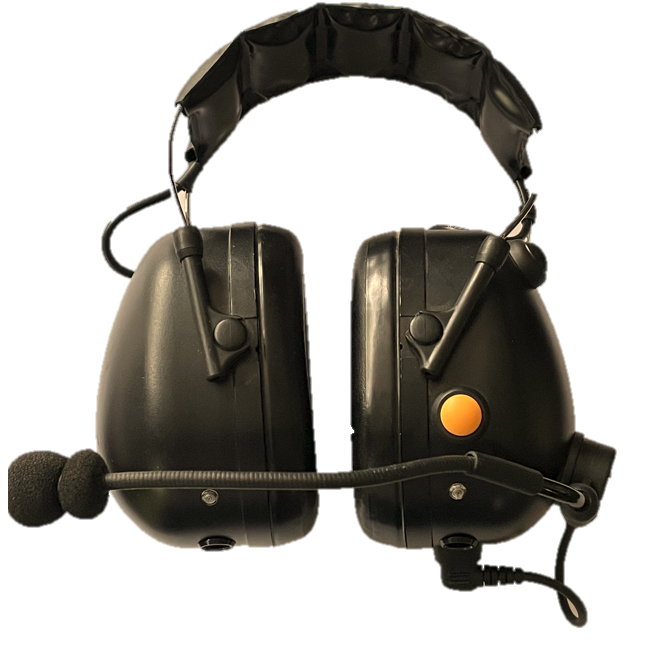
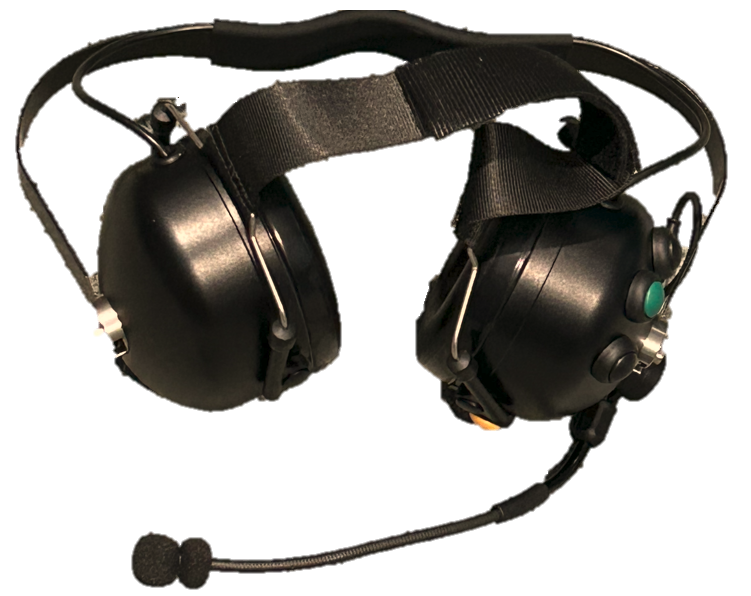
These headsets are light and comfortable to wear all
day, and provide more than 26dB of noise attenuation.
Once you group your workers into one working group, each
member simply talks and all others can hear them. Any
worker can talk or all can talk at once (to shout a
warning). Each worker can Bluetooth to their phone and
receive phone calls, or listen to their music while
working, knowing that any co-worker can still talk to
them at any time (over-riding the music). The workers
can be up to 100-150m apart or spread over a larger
area, (so long as any two remain within between 1m and
100-150m of each other.)
Basic Features
Full Duplex communications
Hands Free - with Vox (voice) activation
100% Autonomous - doesn't need a central base station
Bluetooth Connection to cell phone (music/phone calls)
More than 26dB noise protection
Behind the Head model is NZ Class 5
Phone App compatible with both Android and Apple iOS
Lightweight and comfortable to wear all day.
Unique Features
Mesh Communications - all units talk with each other
with no base station
Everything fitted inside headset – no cords (mic
excepted), or additional boxes to connect
Up to 15 participants in Mesh Group
VOX operated - microphone only turns on when voice
present
Ergonomically designed button locations - matches user’s
finger positions on the left cup
Internal antenna meaning increased reliability
Mic Mute - disconnects microphone for really noisy
spaces
Meshed intercom speech over-rides background music, or
phone, allowing workers to listen to their own music,
safe in the knowledge that their co-workers can still
contact them
Rugged ear cups, microphone boom, buttons, and head-band
and very comfortable to wear
Replaceable Hygiene kits – easily accessible industry
standard foam ear pads
Fully adjustable microphone boom with waterproofing
Available as Over the Head or Behind the Head headset
options, and also Helmet Mount version upon request
Extended battery life for long shifts (16 hours)
4 hour charging from USB Type A port
Voice Activation for features (if enabled)
Voice Prompts for controls
Local speech feedback - can hear oneself (optional)
Options / Controls
Volume Up / Volume Down - Black Buttons on top of left
cup
Power/Multi-function/Bluetooth - Blue button on base of
headset
Mic Mute - Yellow button next to microphone
Intercom/Connect Button - Green button on left cup